
Quick Overview: Loom vs Deckoholic
Both Loom and Deckoholic let you record your screen, but they serve fundamentally different purposes and produce very different results. Understanding this distinction is key to choosing the right tool.
Loom is built for fast async communication — record a quick video, share a link, done. It's the digital equivalent of leaving a voice message, but with your screen. Deckoholic takes a completely different approach: it transforms your raw screen recordings into polished, professional videos using AI-generated voiceovers, lip-synced avatars, and advanced editing tools.
Loom
Best for quick internal videos, team updates, and async communication where speed matters more than polish.
- Instant recording and sharing
- Team collaboration features
- Comments and reactions
- Desktop and mobile apps
Deckoholic
Best for customer-facing content, product demos, tutorials, and any video that needs to look professional.
- AI voiceover generation
- 70+ AI avatars with lip-sync
- Zoom, annotations, blur
- Auto documentation generation
Why Look for Loom Alternatives?
Loom revolutionized async video communication and remains an excellent tool for its intended purpose. However, as video becomes increasingly important for customer communication, marketing, and professional content, many users find themselves needing capabilities that Loom wasn't designed to provide.
Common Loom Pain Points
- Videos look too casual for customer-facing content
- No way to fix verbal mistakes without re-recording
- Background noise and audio quality issues
- Limited editing — can't zoom into important areas
- 5-minute limit on free plan is restrictive
What Teams Are Looking For
- Professional-quality output without production skills
- AI voiceover to avoid recording audio themselves
- Zoom effects to highlight important UI elements
- Documentation alongside videos
- Ability to update videos without re-recording
The Shift in Video Content Expectations
In 2020, a casual Loom recording was impressive. Today, customers and prospects expect polished content. The bar for video quality has risen dramatically, especially for:
Product Demos
First impressions matter — polished demos convert better
Customer Training
Professional content reduces support tickets
Marketing Videos
Quality content builds brand trust
What is Loom?
Loom is a video messaging platform that popularized async video communication in the workplace. Founded in 2015 and acquired by Atlassian in 2023 for $975 million, Loom has over 25 million users worldwide and is particularly popular among remote teams.
The core Loom experience is simple: click record, capture your screen and/or webcam, click stop, and instantly get a shareable link. This simplicity made it the go-to tool for replacing meetings with quick video updates.
Key Loom Features
Quick Recording
Record screen, camera, or both with one click from browser or desktop
Instant Sharing
Get a shareable link immediately after recording — no upload wait
Team Workspaces
Organize videos in folders, share with team members, manage permissions
Auto Transcription
Automatic transcripts in 50+ languages with search functionality
Comments & Reactions
Viewers can leave timestamped comments and emoji reactions
Viewer Analytics
See who watched, when, and how much of your video they viewed
Loom AI Features (Business + AI Plan - $20/month)
Loom introduced AI features in their premium tier, including:
- Edit by Transcript: Remove sections by deleting text from the transcript
- Filler Word Removal: Automatically remove "um", "uh", and awkward pauses
- Auto Chapters: AI-generated chapters for longer videos
- AI Summaries: Quick summaries so viewers can skim key points
Important Note About Loom AI
Loom's AI features are focused on enhancing your existing recordings — removing filler words, generating summaries, creating chapters. They do not include AI voiceover generation or AI avatars. You still need to record with your own voice.
Where Loom Falls Short
Despite its popularity, Loom has significant limitations that become apparent when you need more than basic screen recording. These aren't necessarily flaws — they're simply outside Loom's design focus. But for many users, these gaps are deal-breakers.
No AI Voiceover or Avatar Support
Loom requires you to record your own voice. If you make mistakes, fumble words, have background noise, or simply don't like how you sound, you need to re-record. There's no option for AI-generated narration or virtual presenters.
Impact: Teams without confident speakers struggle to produce professional content. Many employees are uncomfortable recording themselves.
Limited Editing Capabilities
Loom offers basic trimming but lacks professional editing tools. No zoom effects to highlight UI elements, no text overlays for emphasis, no blur for sensitive information, no background music options. What you record is essentially what you get.
Impact: Videos miss opportunities to guide viewer attention. Sensitive data may be accidentally exposed. Content looks unpolished compared to competitors.
5-Minute Limit on Free Plan
The free plan restricts recordings to 5 minutes with a maximum of 25 videos total. While fine for quick messages, this severely limits usefulness for tutorials, demos, or training content.
Impact: Users hit the limit quickly and must upgrade or switch tools. Teams testing Loom can't properly evaluate it for longer-form content.
No Documentation Generation
While Loom provides transcripts, it doesn't generate structured documentation from your videos. If you need step-by-step guides, SOPs, or help articles alongside your video, you'll create them manually.
Impact: Double work — create a video AND write documentation separately. Many viewers prefer written guides alongside video.
Casual Look for Professional Use Cases
Loom videos have an inherently informal feel — great for team updates, but potentially too casual for product demos, marketing content, sales outreach, or customer onboarding. The "talking head in a circle" look has become associated with quick internal communication, not polished deliverables.
Impact: Brand perception suffers when customer-facing content looks rushed. Sales and marketing teams avoid Loom for external use.
Can't Update Without Re-Recording
If your product UI changes, pricing updates, or you notice an error, there's no way to fix it. You must re-record the entire video from scratch.
Impact: Tutorial and demo libraries become outdated quickly. Maintaining video content becomes a major time sink.
What is Deckoholic?
Deckoholic is an AI-powered video platform designed to transform raw screen recordings into studio-quality videos. The core philosophy is different from Loom: instead of recording yourself talking through a demo, you record silently and let AI handle the voiceover, timing, and professional polish.
This approach solves the fundamental challenge many people face: they can demonstrate their product expertly, but struggle with clear narration, background noise, verbal mistakes, or simply dislike being on camera. Deckoholic separates the "showing" from the "telling" and handles the telling with AI.
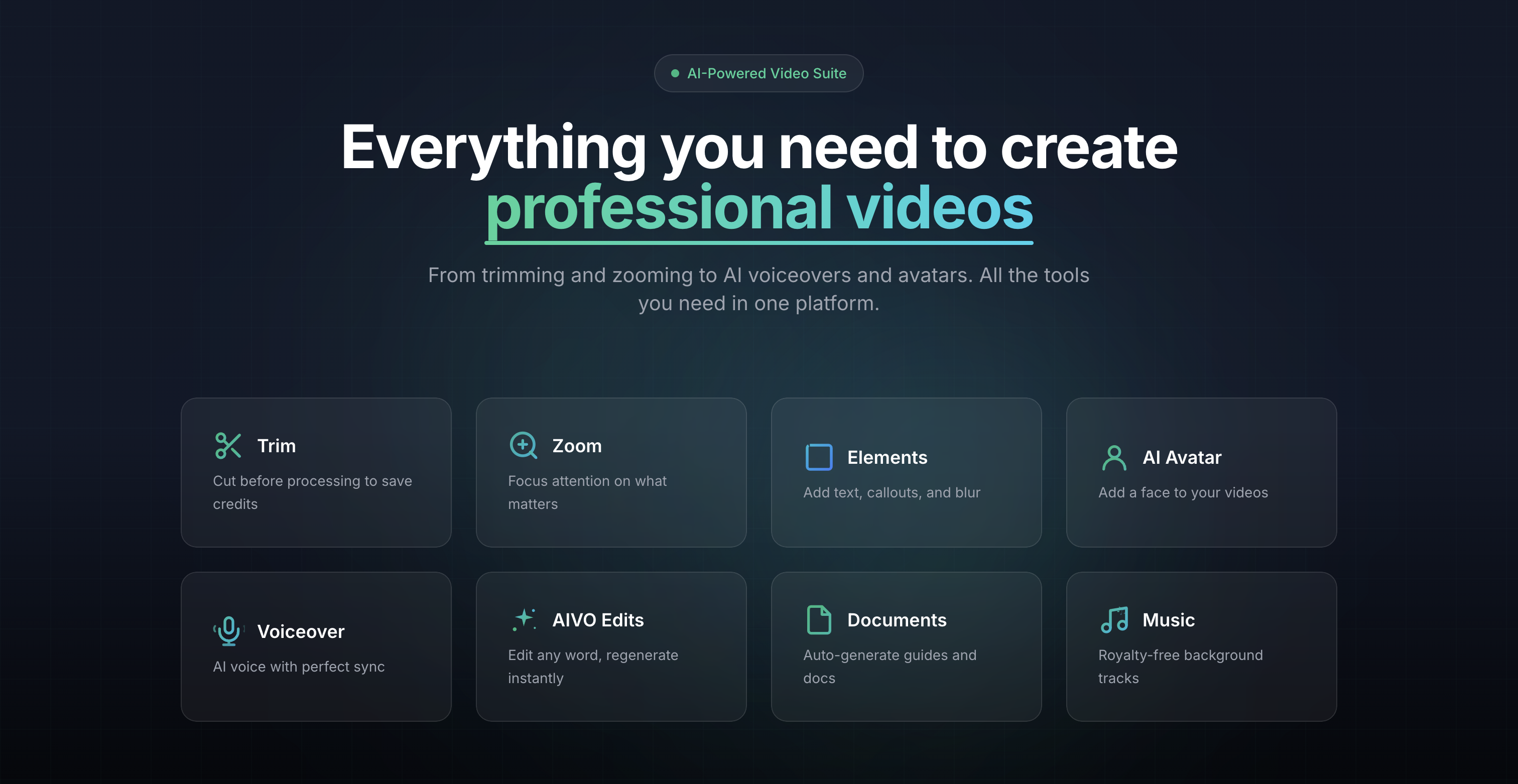
Core Deckoholic Features
AI Voiceover
40+ natural-sounding voices that sync perfectly with your video actions
AI Avatars
70+ professional presenters with automatic lip-sync for a human touch
Zoom Effects
Draw attention to buttons, forms, and important UI elements with smooth zoom
AIVO Editing
Change any word in your script — AI regenerates only that segment
Auto Documentation
Generate step-by-step guides with screenshots from any video
Text & Callouts
Add titles, annotations, callout boxes, and blur effects
Smart Trimming
Trim before AI processing to save credits and time
Background Music
Royalty-free tracks with smart volume balancing
The Deckoholic Workflow
Creating a professional video with Deckoholic follows a simple three-step process:
Record Silently
Record your screen demonstrating your product or workflow. No microphone needed — you can record in silence, in a noisy environment, or anywhere convenient.
AI Generates Content
Deckoholic AI watches your recording and creates a script explaining what's happening. It then generates voiceover and syncs everything automatically.
Polish & Export
Add zoom effects to highlight key moments, include an AI avatar, add annotations, and export your professional video and documentation.
What Makes Deckoholic a Strong Loom Alternative
For users who need more than basic screen recording, Deckoholic offers capabilities that fundamentally change what's possible with video content creation.
Record in Silence, Get Professional Voiceover
This is Deckoholic's killer feature. You never need to record your voice — record silently and let AI generate natural-sounding narration. No more retakes due to fumbled words, background noise, or self-consciousness about your voice.
Real example: A product manager records a 10-minute feature demo in a busy open office. Despite phones ringing and conversations nearby, the final video has crystal-clear professional voiceover perfectly explaining each action.
AI Avatars for a Human Touch
Add a professional presenter to your video without appearing on camera yourself. Choose from 70+ diverse avatars that lip-sync to your voiceover, providing visual engagement without the need for lighting, makeup, or camera comfort.
Perfect for: Teams where no one wants to be on camera, multilingual content with consistent presenters, scaling video production beyond a few comfortable speakers.
AIVO Editing: Fix Without Re-Recording
Made a mistake in your script? Need to update a feature name? Don't re-record — just click on the word, edit it, and Deckoholic regenerates only that segment. Everything else stays perfectly intact.
Time saved: What used to require re-recording a 10-minute video now takes 30 seconds. Teams can keep video libraries updated without constant re-work.
Professional Zoom and Focus Effects
Guide viewer attention with smooth zoom effects. When you click a button or fill out a form, zoom in to show the detail. This creates the polished look viewers expect from professional software content.
Use case: Product demos where you need to highlight specific buttons, form fields, or small UI elements that would be hard to see in a full-screen recording.
Automatic Documentation Generation
Every video can automatically become a step-by-step guide with screenshots. Export as PDF, DOCX, or share as a public link. Stop creating documentation separately from videos.
Double value: Create one recording and get both a video tutorial and written documentation. Perfect for help centers, SOPs, and training materials.
Quick Feature Availability
| Feature | Loom | Deckoholic |
|---|---|---|
| AI Voiceover | ||
| AI Avatars | ||
| Zoom Effects | ||
| Text/Callout Overlays | ||
| Auto Documentation | ||
| Edit Script Post-Recording |
Complete Feature-by-Feature Comparison
A comprehensive breakdown of what each tool offers across different categories. This detailed comparison helps you understand exactly where each tool excels.
Recording Capabilities
| Feature | Loom | Deckoholic |
|---|---|---|
| Screen recording | ||
| Webcam recording | ||
| Browser extension | ||
| Desktop app | ||
| Mobile recording | ||
| Max recording length (Free) | 5 min | 2 min |
| Max recording length (Paid) | Unlimited | 15 min |
| Record silently (no voice needed) |
AI & Automation
| Feature | Loom | Deckoholic |
|---|---|---|
| AI-generated voiceover | ||
| AI avatars with lip-sync | ||
| AI script generation | ||
| AIVO editing (edit script, not video) | ||
| Auto transcription | ||
| Edit by transcript | Paid only | |
| Filler word removal | Paid only | |
| AI-generated documentation | ||
| Auto chapters | Paid only | |
| AI summaries | Paid only |
Video Editing
| Feature | Loom | Deckoholic |
|---|---|---|
| Trim & cut | ||
| Zoom effects | ||
| Pan effects | ||
| Text overlays & titles | ||
| Callout annotations | ||
| Blur sensitive info | ||
| Background music | ||
| Custom intro/outro | ||
| Speed control |
Sharing & Distribution
| Feature | Loom | Deckoholic |
|---|---|---|
| Shareable links | ||
| Video comments | ||
| Emoji reactions | ||
| CTA buttons | ||
| Password protection | ||
| Video analytics | ||
| Download as MP4 | ||
| Export as documentation |
Team & Collaboration
| Feature | Loom | Deckoholic |
|---|---|---|
| Team workspaces | ||
| Shared video library | ||
| User permissions | ||
| SSO/SAML | Enterprise | |
| Admin controls |
Best Use Cases: When to Choose Each Tool
The right choice depends entirely on what you're trying to accomplish. Here's a practical breakdown of which tool works best for common video creation scenarios.
Internal Team Communication
Quick updates, status reports, code reviews, explaining decisions to teammates.
Loom's speed and simplicity shine here. Record, share, done. The casual style is acceptable for internal use, and features like comments and reactions are valuable for team engagement.
Customer Product Demos
Feature walkthroughs, new release announcements, prospect demonstrations.
Professional voiceover, zoom effects to highlight UI elements, and AI avatars create the polished experience customers expect. These demos often influence buying decisions — quality matters.
Customer Onboarding & Training
Getting started guides, feature tutorials, educational content libraries.
Auto-generated documentation alongside videos means customers get both formats. AIVO editing lets you update content as your product evolves without complete re-recordings.
Marketing & Promotional Content
Website videos, social content, promotional clips, brand storytelling.
Marketing content needs to look professional. AI avatars, polished voiceover, custom branding options, and background music create content that represents your brand well.
Personalized Sales Outreach
Individual prospect videos, personalized demos, follow-up communications.
For high-volume, quick personalized messages, Loom's speed is valuable. For important prospects where quality matters, Deckoholic's polished output makes a stronger impression.
Help Center & Documentation
Knowledge base articles, how-to guides, FAQ content, troubleshooting.
Automatic documentation generation is invaluable here. Create a video walkthrough and instantly get a written guide with screenshots — both formats that help center visitors need.
Pricing Comparison: Loom vs Deckoholic
Both tools offer free plans with paid upgrades. The pricing reflects their different value propositions — Loom charges for recording time and storage, while Deckoholic charges for AI processing power.
Free Tier
- 5 min recording limit
- 25 videos max
- Basic editing
- Auto transcription
- Viewer insights
- 2 min recording limit
- Unlimited videos
- 2 min AI voice/month
- Unlimited AI guides
- Basic elements
Individual/Creator Tier
- Unlimited recording
- Unlimited storage
- Engagement insights
- Custom branding
- Drawing tools
- 10 min recordings
- 30 min AI voice/month
- 10 min AI avatar/month
- All elements & annotations
- Priority processing
Professional Tier
- Everything in Business
- Auto chapters
- Filler word removal
- Edit by transcript
- AI summaries
- 15 min recordings
- 120 min AI voice/month
- 60 min AI avatar/month
- Priority support
- Custom branding
Understanding the Price Difference
Loom is significantly cheaper, but the tools serve different purposes. Loom's pricing is based on recording time and storage — commoditized resources. Deckoholic's pricing reflects the AI compute required for voiceover generation, avatar synthesis, and intelligent video processing.
The real question: What's the cost of low-quality video content? If a polished product demo converts 10% better, or professional training reduces support tickets by 20%, the investment in better tools often pays for itself quickly.
Other Loom Alternatives to Consider
While we believe Deckoholic is the best choice for professional video content, we want to give you a complete picture of the market. Here are other popular Loom alternatives and what they're best suited for.
Camtasia
$313 one-timeProfessional desktop video editing software with screen recording. Best for users who need advanced editing features and are comfortable with a learning curve.
Best for: Desktop power users, complex editing
Pros
- Powerful editing tools
- One-time purchase
- Offline editing
Cons
- Steep learning curve
- No AI features
- Desktop only
Vidyard
Free - $59/mo+Enterprise video platform focused on sales and marketing teams. Offers video hosting, analytics, and integrations with CRM tools.
Best for: Sales teams, enterprise video hosting
Pros
- CRM integrations
- Advanced analytics
- Enterprise features
Cons
- Limited editing
- No AI voiceover
- Expensive for full features
ScreenPal (Screencast-O-Matic)
Free - $6/moBudget-friendly screen recorder with basic editing. Good for educators and those who need simple recordings without advanced features.
Best for: Budget-conscious users, educators
Pros
- Very affordable
- Easy to use
- Educational discounts
Cons
- Basic features
- No AI capabilities
- Limited professional polish
Descript
Free - $24/mo+Innovative video editor that lets you edit video by editing text. Great for podcast-style content and transcript-based editing.
Best for: Podcasters, transcript-based editing
Pros
- Edit by transcript
- Good for podcasts
- Overdub voice cloning
Cons
- Complex interface
- Not focused on screen recordings
- Learning curve
Screen Studio
$89 one-timeMac-only screen recorder that automatically adds smooth zoom effects. Popular among developers and tech content creators.
Best for: Mac users, developer content
Pros
- Beautiful auto-zoom
- Mac-native
- One-time purchase
Cons
- Mac only
- No AI voiceover
- Limited editing beyond zoom
Why Deckoholic Stands Out
While each alternative has its strengths, Deckoholic is the only tool that combines:
- AI voiceover generation (no other screen recorder offers this)
- AI avatars with lip-sync (unique to Deckoholic)
- AIVO editing to update content without re-recording
- Automatic documentation generation alongside video
If you need professional video output and don't want to spend time perfecting your on-camera presence, Deckoholic offers capabilities no other tool provides.
Who Should Use What?
Here's our honest recommendation based on your specific situation and needs.
Choose Loom If You...
- Primarily send quick video messages to teammates
- Value speed over polish — "good enough" works for you
- Need video comments and engagement features
- Require team collaboration with shared workspaces
- Are comfortable speaking on camera
- Want a desktop app and mobile recording
- Need budget-friendly pricing for basic features
Choose Deckoholic If You...
- Create customer-facing demos and tutorials
- Want professional voiceovers without recording yourself
- Need AI avatars because no one wants to be on camera
- Want to zoom, annotate, and add visual effects
- Need auto-generated documentation with your videos
- Value quality and polish for marketing/sales content
- Want to update videos without re-recording
The Hybrid Approach
Many teams successfully use both tools. Loom for day-to-day internal communication where speed matters and casual is fine. Deckoholic for anything external or customer-facing where quality and professionalism drive results. The free tiers of both tools make it easy to have both available.
The Verdict: Loom vs Deckoholic
Loom and Deckoholic solve different problems. This isn't a case of one tool being universally better — they excel in completely different scenarios.
Loom is the faster, simpler option for internal team communication. It pioneered async video messaging and remains excellent at it. Record, share, done. When you need to quickly explain something to a colleague and polish doesn't matter, Loom is hard to beat.
Deckoholic is for when your video needs to look professional. Product demos that influence buying decisions. Customer tutorials that build trust. Marketing content that represents your brand. Training materials that reduce support load. Anywhere the quality of your video directly impacts business outcomes, Deckoholic's AI-powered approach produces results that Loom simply cannot match.
The AI voiceover and avatar features mean you can create polished, professional videos without needing great public speaking skills, expensive recording equipment, or a quiet environment. This democratizes professional video creation in a way no other tool does.
Our Bottom Line
If you're reading this comparison, you're probably looking for more than what Loom offers. You want your videos to look professional. You want to stop worrying about how you sound on camera. You want editing capabilities that match your ambition.
Try Deckoholic's free tier. Record a demo of your product silently. Let the AI generate voiceover and sync everything. See the difference in output quality for yourself. Most users who try it don't go back to recording themselves.
Frequently Asked Questions
Common questions about Loom, Deckoholic, and choosing between them.
What is the best Loom alternative in 2026?
The best Loom alternative depends on your specific needs. For professional, polished videos with AI-generated voiceovers and avatars, Deckoholic is the standout choice. If you need powerful desktop editing, Camtasia is popular. For enterprise video hosting with CRM integrations, Vidyard works well. Deckoholic is unique because it transforms silent screen recordings into studio-quality content using AI — something no other tool offers.
Can I switch from Loom to Deckoholic easily?
Yes. While you cannot directly import Loom videos, you can start fresh with Deckoholic and immediately take advantage of AI voiceovers, avatars, and professional editing features. Many users find they can create better content faster with Deckoholic's AI-powered workflow. The learning curve is minimal — most users are productive within their first session.
Is Deckoholic good for quick async videos like Loom?
Deckoholic is optimized for creating polished, professional videos from screen recordings. If you need to send a quick 30-second informal message to a colleague, Loom's simplicity might be faster. However, if you want that same recording to look professional with AI voiceover and visual polish, Deckoholic is the better choice — and the result will be significantly more impactful.
Does Deckoholic have a desktop app?
Currently, Deckoholic works entirely in your browser with a Chrome extension for recording. This means no downloads required, automatic updates, and access from any computer. Many users prefer this approach as it eliminates installation hassles and ensures they always have the latest features.
Can I use my own voice instead of AI?
Deckoholic is specifically designed around AI-generated voiceovers that sync with your video. This allows you to record silently — no worrying about background noise, fumbled words, or retakes — and have professional narration added automatically. If you strongly prefer using your own voice with minimal editing, Loom might be a better fit for that specific workflow.
Which tool is better for customer-facing content?
For customer-facing content like product demos, tutorials, marketing videos, and onboarding materials, Deckoholic produces significantly more polished results. Its AI avatars provide a professional presenter feel, zoom effects highlight important UI elements, and the AI voiceover ensures consistent, clear narration. Loom's casual style works for internal team updates but often looks too informal for customer-facing use.
Does Deckoholic support team collaboration?
Deckoholic currently focuses on individual creators and small teams. For enterprise-level collaboration with extensive shared workspaces, granular permissions, and advanced team management features, Loom's Business plans offer more robust capabilities. However, most small to medium teams find Deckoholic's features sufficient for their collaborative needs.
How does Loom pricing compare to Deckoholic?
Loom is generally cheaper: Free (5 min limit), Business at $15/month, Business+AI at $20/month. Deckoholic is priced higher: Free (2 min), Creator at $39/month, Startup at $220/month. The price difference reflects fundamentally different offerings — Loom charges for recording time and storage, while Deckoholic charges for AI processing including voiceover generation, avatar creation, and video rendering. If you need professional output, Deckoholic provides features Loom simply doesn't offer at any price.
Can Deckoholic generate documentation from my videos?
Yes, this is one of Deckoholic's standout features. It automatically generates step-by-step documentation from your videos, complete with screenshots and descriptions. You can export these guides as PDF, DOCX, or share them as public links. This is included in all plans, even free, and is invaluable for creating help docs, SOPs, and training materials alongside your videos.
Does Loom have AI voiceover or avatar features?
No. Loom does not offer AI voiceover generation or AI avatars. You must record with your own voice. Loom's AI features are limited to transcription, filler word removal, auto-chapters, and summaries (available on paid plans). For AI-generated narration or virtual presenters, you need a different tool like Deckoholic.
What is AIVO editing in Deckoholic?
AIVO (AI Video Optimization) is Deckoholic's unique editing feature that lets you modify your script after the video is generated. Simply click on any word or sentence, edit the text, and Deckoholic regenerates only that segment — the rest of your video stays intact. This is incredibly powerful for fixing mistakes, updating information, or A/B testing different messaging without re-recording or re-rendering the entire video.
Is Deckoholic suitable for non-English content?
Yes. Deckoholic supports multiple languages for AI voiceover generation. You can record your screen in any language context and generate voiceover in your preferred language. This makes it excellent for creating multilingual content or reaching international audiences without needing native speakers for each language.
What industries benefit most from switching from Loom to Deckoholic?
Industries that see the biggest improvements include: SaaS companies creating product demos and feature announcements, customer success teams building onboarding and training content, marketing teams producing promotional and explainer videos, sales teams creating personalized outreach, educational institutions developing course materials, and any organization that needs professional video content at scale.
Can I blur sensitive information in Deckoholic?
Yes. Deckoholic includes blur elements that let you hide passwords, credit card numbers, personal data, or any sensitive information that appears in your screen recordings. You can precisely control the timing and positioning of blur effects, ensuring sensitive content is protected while keeping the rest of your video visible.
How long does it take to create a video in Deckoholic vs Loom?
Loom is faster for raw, unpolished recordings — record and share in seconds. Deckoholic takes longer because of AI processing (typically 2-5 minutes depending on video length), but the output is significantly more professional. Many users find that the time saved from not needing retakes, not editing audio, and not creating separate documentation makes Deckoholic more efficient overall for their use cases.
Related guides
Ready to Create Professional Videos?
Try Deckoholic free and experience the difference AI-powered video creation makes. Record silently, get professional voiceover, add polish, impress your audience.
Get Started FreeNo credit card required. 2 minutes of AI voice free every month.